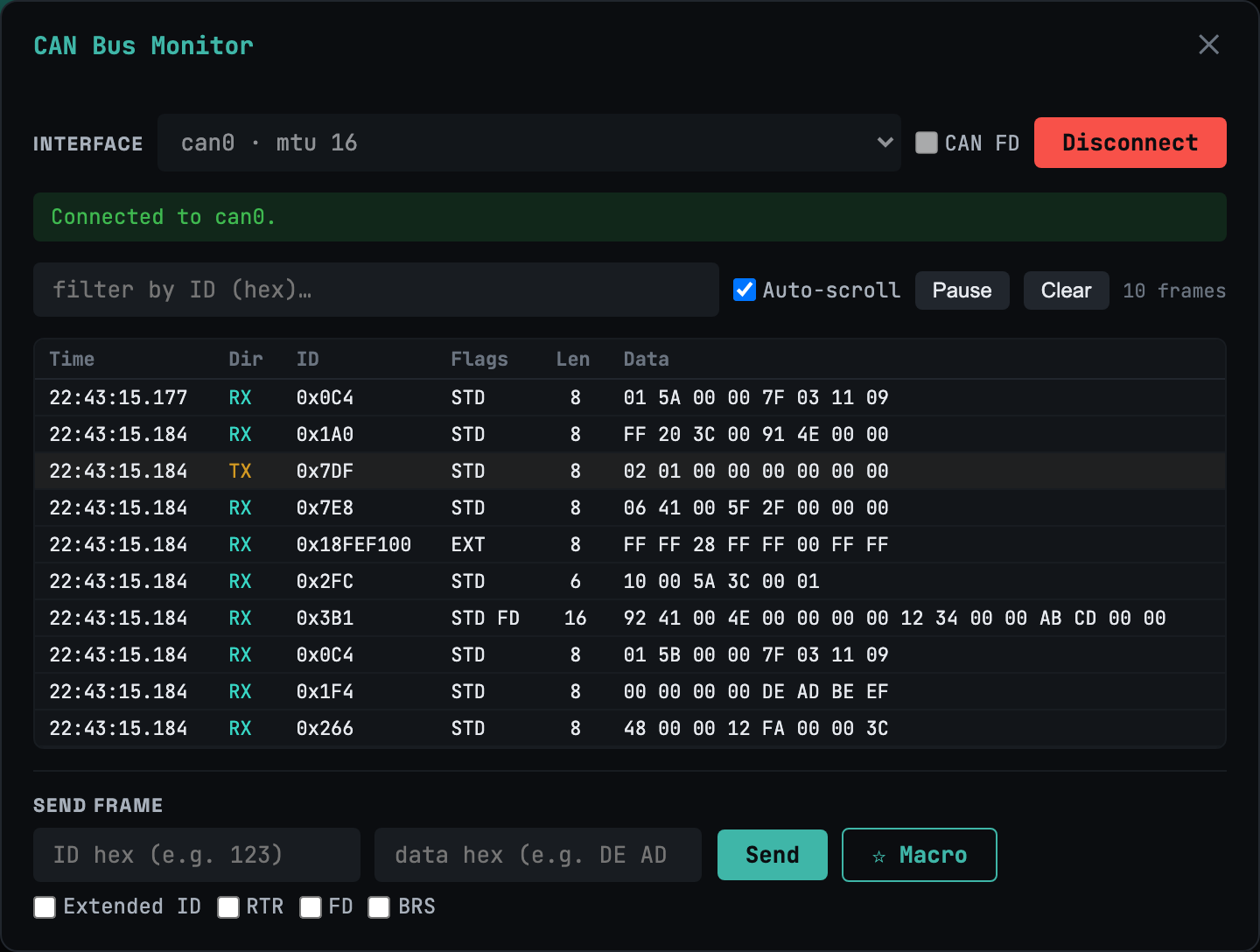
CANバスモニター
クラシック + FD16進フィルタ・一時停止・フレームインジェクタ付きのライブフレームストリーム。BRS対応のクラシックCANとCAN-FD — 拡張ID、RTR、ひと通り揃っています。
ほとんどのWebターミナルはSSHどまりです。 webtm はシリアル/UART、CAN / CAN-FD、UDS、XCPにも対応します — ハードウェアと車両のライブ診断に、AI支援デバッグまで。すべてセルフホストで、自分で動かす単一の静的バイナリ上で完結します。
$ curl -fsSL https://webtm.dev/install.sh | sh
On iPad or iPhone? That command runs on your Mac, Linux box, or Raspberry Pi. Install webtm there, then open it in Safari and tap Share → Add to Home Screen for the full-screen app — virtual key bar, swipe drawer, and all.
個人利用は無料 · iPadで動作 · アカウント登録なしで試用可
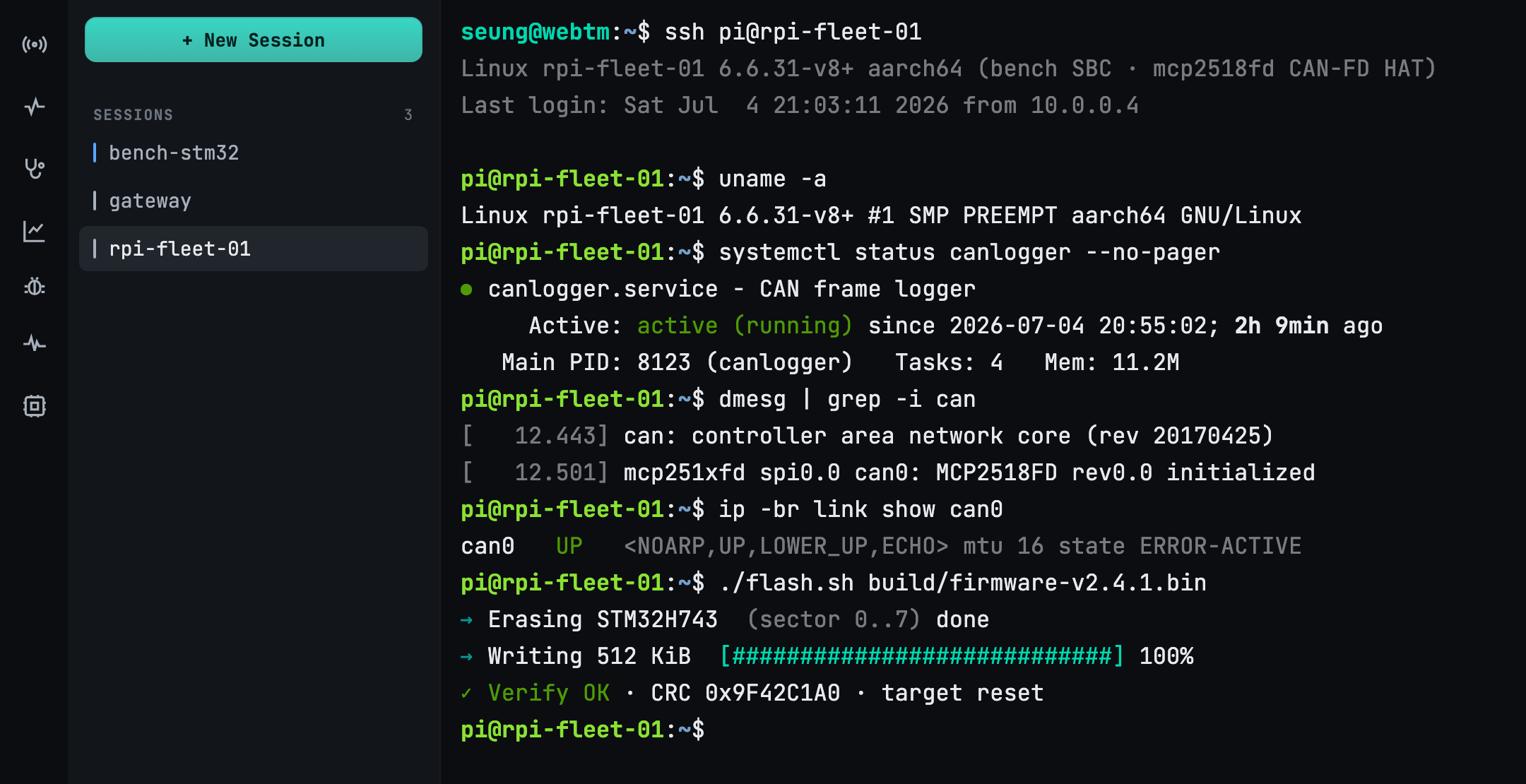
WebSocket上での完全なxterm.jsエミュレーション。tmuxが切断をまたいで全セッションを維持 — タブを閉じても、戻れば何も失われません。
開く /dev/ttyUSB*, ttyACM*, tty.* をブラウザから開きます。ホットプラグ検出が再起動なしで新しいアダプターを見つけます — iPadからでも。
CAN / CAN-FD モニタ、DoIP・ISO-TP 経由の UDS 車両診断、ライブ DAQ による XCP 測定 — すべてを単一の統合トランスポート上で。
Bring your own model (BYOK). Feed a serial log for root-cause, a code fix, a build and a
shareable report — or just ask in plain language: “send start to every
serial.” The agent lists the targets, proposes the action, and waits for your approval
before it runs.
シリアル、CAN、車載UDS、XCPキャリブレーションを — 単一の
/ws/x WebSocket上で多重化。URIでデバイスを選ぶと、パネルがプロトコルを描画します。
16進フィルタ・一時停止・フレームインジェクタ付きのライブフレームストリーム。BRS対応のクラシックCANとCAN-FD — 拡張ID、RTR、ひと通り揃っています。
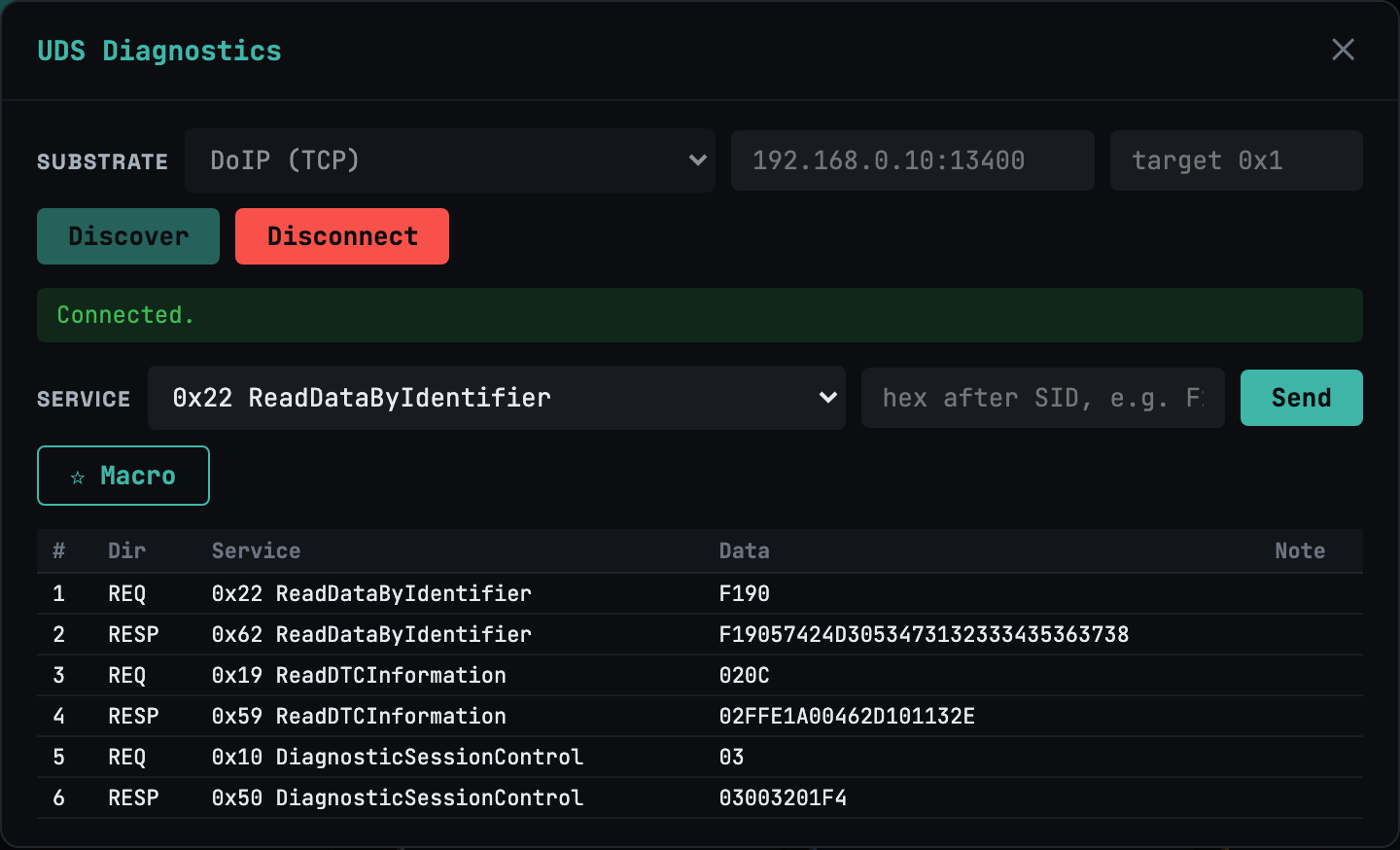
DoIP/TCP と ISO-TP/CAN(CAN-FD も)上のサービスビルダー。フロー制御ペーシング、読み取り専用ゲーティング、そして DoIP UDP の Discover で告知されたECUを検出。
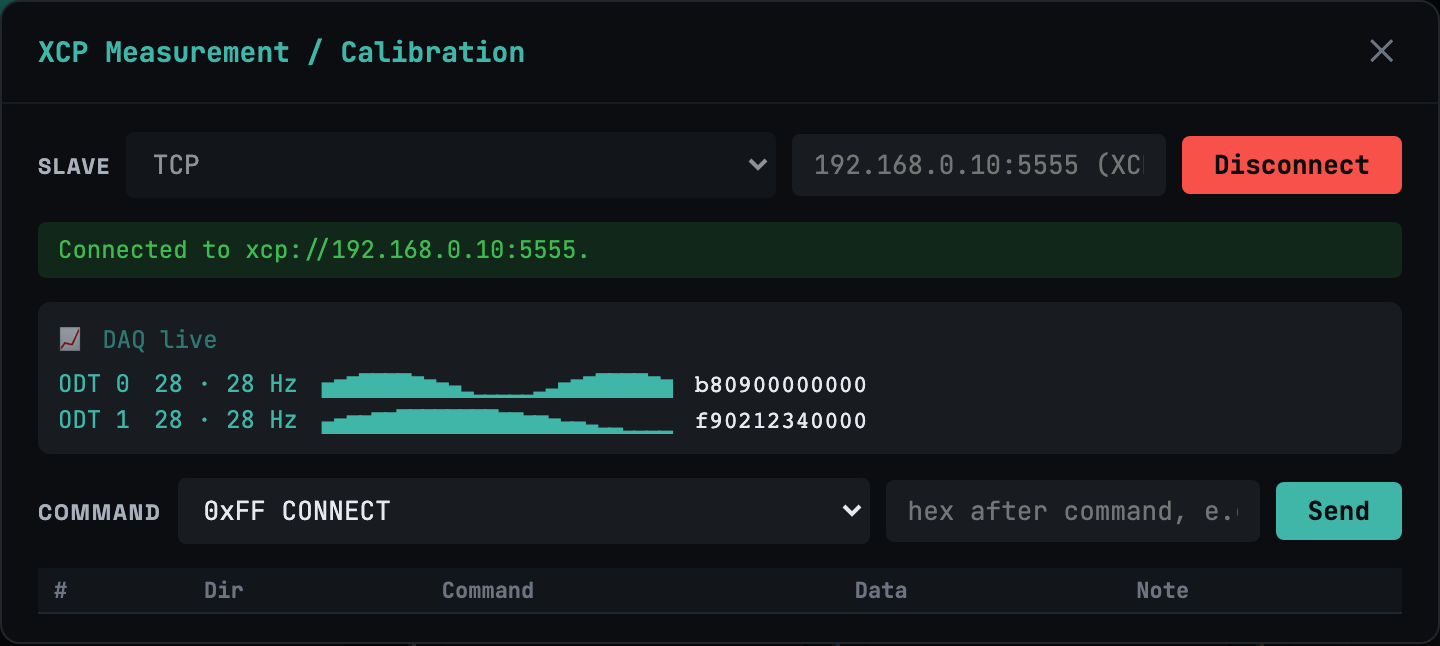
Ethernet(TCP/UDP)とCAN上のXCP。コマンドビルダーに加え、ライブの DAQ ビュー — 周期的な測定値をブラウザへ直接ストリーミングします。
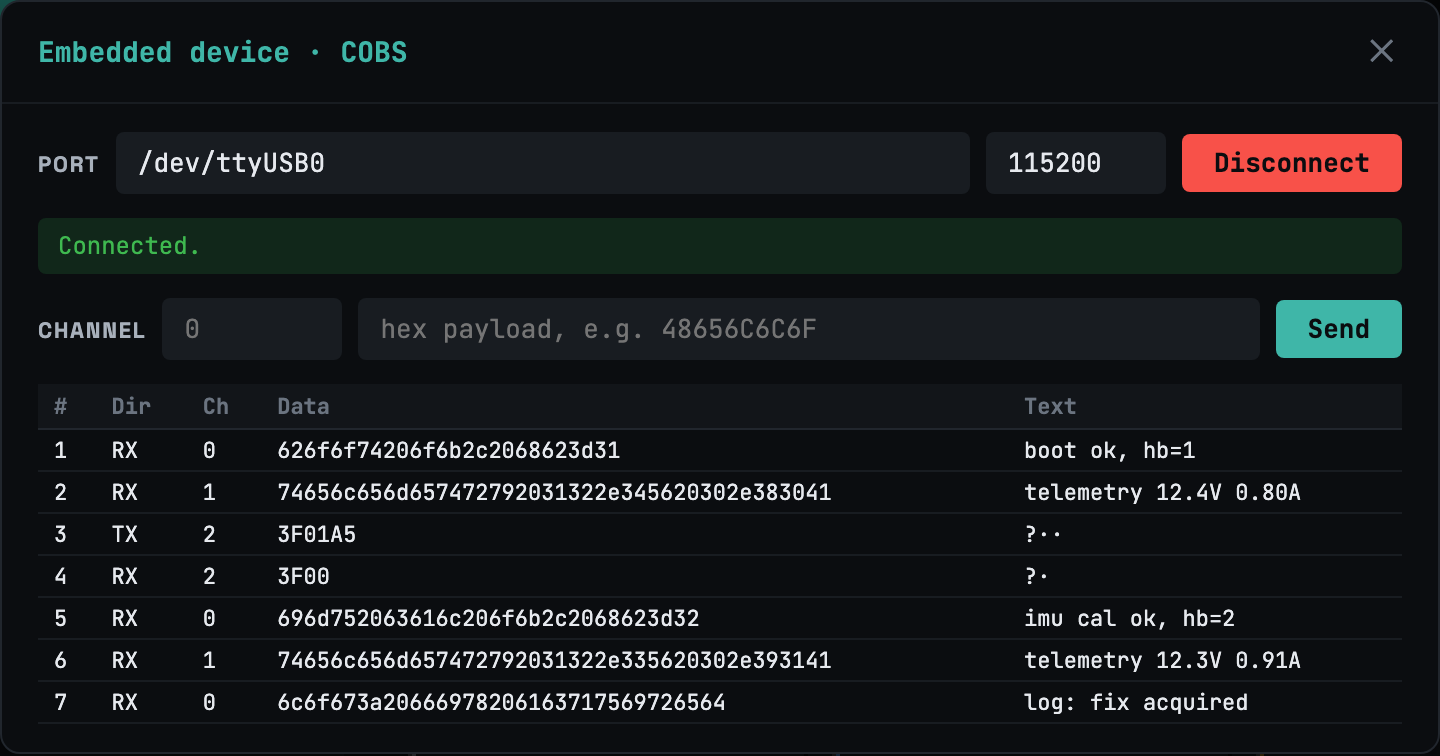
開く serial://…?framing=cobs でCOBS+CRCのチャネル多重リンクを開きます — 🧩 Embedパネルで1本のUARTをきれいな論理チャネルに分割。
どのデバイスも、次の上のただのURIです: /ws/x.
# serial byte stream / COBS-framed
serial:///dev/ttyUSB0?baud=115200
serial:///dev/ttyUSB0?framing=cobs

# CAN / CAN-FD
can://can0?fd=1

# UDS over DoIP (TCP) / over ISO-TP (CAN-FD)
uds://doip/192.168.0.10:13400
uds://can0/0x7E0?rx=0x7E8&fd=1

# XCP on Ethernet / on CAN
xcp://eth/192.168.0.10:5555
xcp://can0/0x100?rx=0x101&fd=1

# remote device via agent (Ultra)
agent://rpi-001/serial/ttyUSB0?baud=115200
仕事のすべてを1つのWeb画面で — 接続、永続化、ブロードキャスト、デバッグ。
セッションごとの256KBリングバッファとスマート再接続が、取りこぼした全バイトを再生。不安定なWi-Fiはもう問題になりません。
1つのコマンドを多数のボードへ一度に — 並列・順次・ローリングで — 各デバイスの出力を並べて確認。
仮想キーバー(Esc, Tab, Ctrl, 矢印)と ⌘K コマンドパレットで、スマホやタブレットでも本物のターミナルが使えます。
エージェントはリモートボードのシリアルやCANを次として公開します: agent:// として公開します — join トークンで自己登録し、地球の裏側のハードウェアをデバッグできます。
ライブセッションの読み取り専用URLを渡すだけ — 相手側にインストール・アカウント・セットアップは不要。
10MBの静的バイナリ1つ、 CGO_ENABLED=0、Webアセットも同梱。PWAインストール、オフライン対応、Cloudflare Tunnel ならフラグ1つで公開。
自分のモデルを持ち込み — Claude、OpenAI、またはローカルのOllama。一連の流れはすべてタブ内で完結。
HardFaultやスタックトレースがシリアルコンソールに現れる。
モデルがログを読み、根本原因を特定。
パッチを提案し、あなたが承認すると、ビルドします。
共有可能なWebレポートが、何がなぜ変わったかを記録。
SSHクライアントはSSHまで。シリアルツールはシリアルまで。CANや診断スイートはそれぞれ別アプリ。webtmは作業台そのものです。
| Teleport tmate | minicom | SavvyCAN | CANape | webtm | |
|---|---|---|---|---|---|
| SSHターミナル | ✓ | — | — | — | ✓ |
| シリアル / UART | — | ✓ | — | — | ✓ |
| CAN / CAN-FD モニタ | — | — | ✓ | ✓ | ✓ |
| UDS診断(DoIP/ISO-TP) | — | — | — | ✓ | ✓ |
| XCP測定 / DAQ | — | — | — | ✓ | ✓ |
| 1:N ブロードキャスト · AI エージェント | — | — | — | — | ✓ |
| ブラウザで · iPadで動作 | — | — | — | — | ✓ |
| セルフホスト、単一バイナリ | — | ✓ | ✓ | — | ✓ |
競合はどれも作業台の一点にすぎません。すべてをこなすのはwebtmだけ — ブラウザから、セルフホストで。
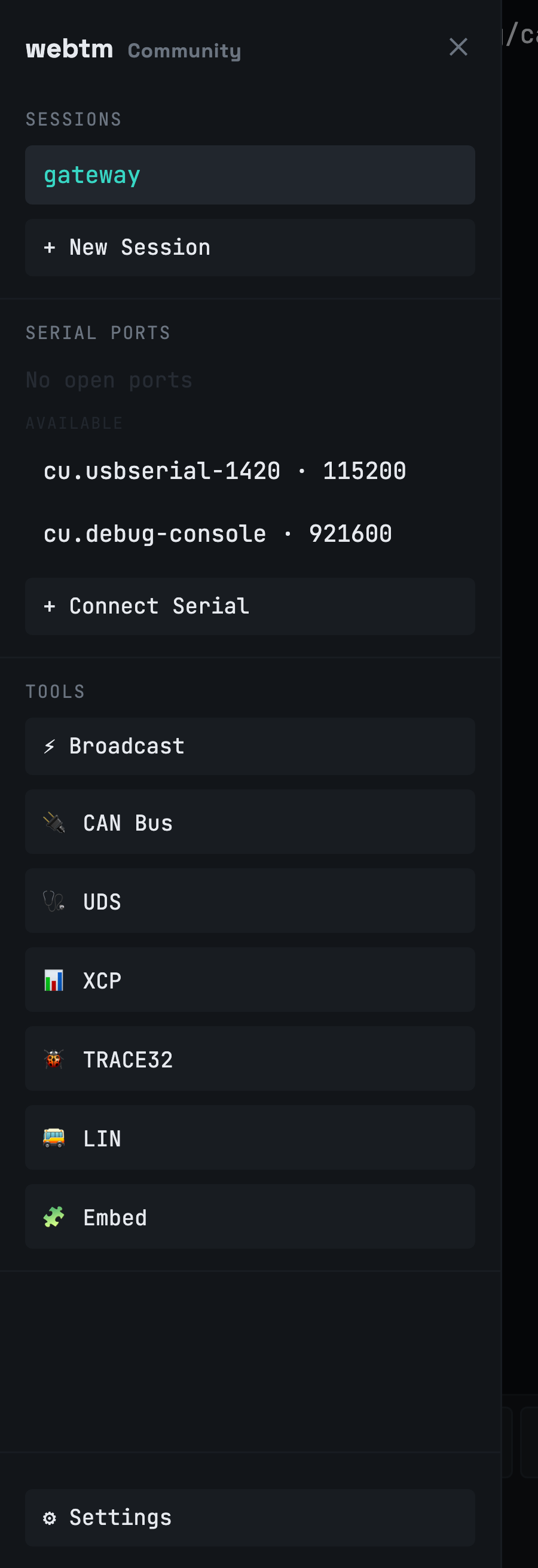
webtmはPWAとしてインストールでき、タッチ環境では全画面表示に。仮想キーバーがEsc・Tab・Ctrl・矢印を親指の下に配置し、スワイプ式ドロワーにセッション・ポート・診断をまとめます。他では決してできないこと:タブレットからハードウェアのシリアルコンソールを開く。
webtm はセルフホストです。ttyd とシリアルマネージャは 127.0.0.1 のみにバインドします — ゲートウェイが唯一の入り口で、認証・ライセンス・セッション制限はそこにあります。生のオートモーティブ送信(DoIP/XCP)はオプトインで、既定では無効です; tcp:// には SSRF ガードがあります。ライセンスは Ed25519 署名でオフライン検証され、起動時のコールホームは一切ありません。
自分で動かせます — 個人・非商用は無料。チーム、スケール、ハードウェアフリート機能が必要になったときだけアップグレード。
個人・非商用利用
現役の開発者向け
組込みチーム・機器フリート向け
| Community | Pro | Ultra | |
|---|---|---|---|
| SSHターミナルセッション | 2 | 無制限 | 無制限 |
| ローカルシリアル / UARTポート | 1 | 無制限 | 無制限 |
| CAN · UDS · XCP 診断 | ✓ | ✓ | ✓ |
| tmux永続化 · PWA · ⌘K | ✓ | ✓ | ✓ |
| 読み取り専用のセッション共有 | — | ✓ | ✓ |
| マルチユーザーアカウント | — | ✓ | ✓ |
| デバイス単位のアクセス制御 | — | ✓ | ✓ |
| リモートシリアル / CAN(Agent) | — | — | ✓ |
| 1:Nブロードキャスト | — | — | ✓ |
| AIデバッグ(BYOK) | — | — | ✓ |
| 条件付きアクセスポリシー | — | — | ✓ |
| 監査ログ | — | — | ✓ |
Billed via Paddle · licenses are Ed25519-signed and validate offline. Already subscribed? Manage or cancel your subscription.
✅ Payment received — your license key is on its way to your inbox. Install webtm below, then paste the key in Settings → Billing.
The short version of what webtm is, how it differs, and what it costs.
webtm is a self-hosted web terminal that runs as a single 10 MB static binary.
In one browser tab it provides SSH and serial/UART consoles, CAN / CAN-FD monitoring,
UDS (ISO 14229) and XCP vehicle diagnostics, and AI-assisted debugging. Every device is
addressed as a URI multiplexed over a single /ws/x WebSocket.
Most web terminals stop at SSH, and serial, CAN, and diagnostic suites are each a separate app. webtm is the only one that combines SSH, serial/UART, CAN / CAN-FD, UDS diagnostics, XCP measurement, 1:N broadcast, and an AI agent — from a browser, self-hosted on one binary, and usable on an iPad.
Community is free for personal and non-commercial use (2 SSH sessions, 1 serial port, full CAN/UDS/XCP diagnostics). Pro is $9/month for unlimited sessions, session sharing, multi-user accounts, and per-device access control. Ultra is $39/month, adding remote serial/CAN agents, 1:N broadcast, AI debugging (bring your own key), conditional access, and audit logs. Billing is via Paddle and licenses validate offline.
webtm is self-hosted, so your data stays on your machine. ttyd and the serial manager bind
to 127.0.0.1 only; the gateway is the single door where auth (bcrypt/JWT),
license, and session limits live. Raw automotive egress (DoIP/XCP) is opt-in and off by
default, tcp:// has an SSRF guard, and licenses validate offline with Ed25519
signatures — there is no call-home on startup.
Yes. You install webtm on a Mac, Linux box, or Raspberry Pi, then open it in Safari and add it to the Home Screen as a PWA. It goes full-screen on touch with a virtual key bar (Esc, Tab, Ctrl, arrows), a swipe session drawer, and a ⌘K command palette — letting you open a serial console on real hardware from a tablet.
AI debugging is bring-your-own-key (BYOK): you can use Claude, OpenAI, or a local Ollama model. The agent reads a serial log to find the root cause, proposes a fix, builds it, and generates a shareable report — waiting for your approval before it runs any action. It is available on the Ultra plan.