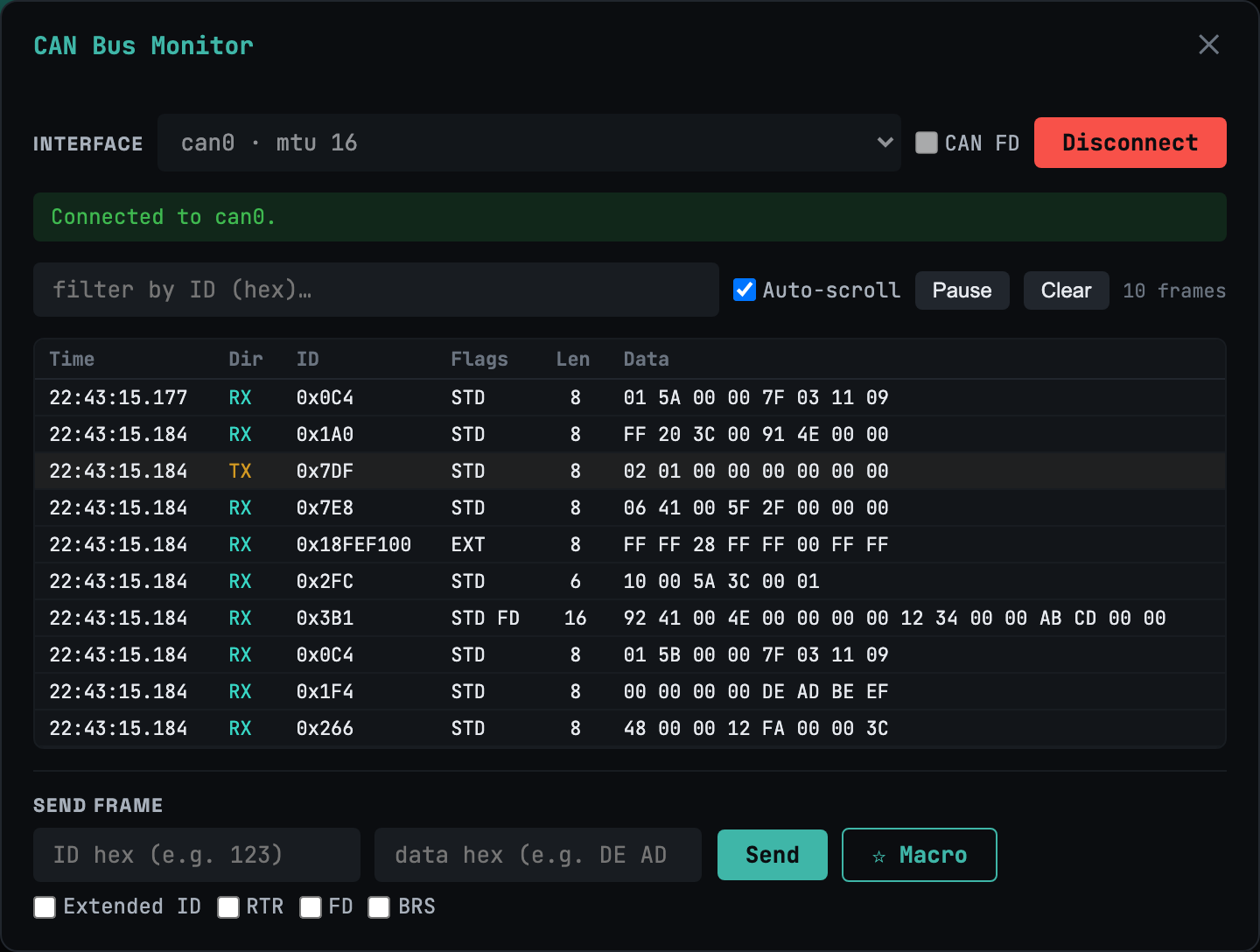
CAN bus monitor
classic + FDLive frame stream with hex filter, pause, and a frame injector. Classic CAN and CAN-FD with BRS — extended IDs, RTR, the lot.
Most web terminals stop at SSH. webtm also speaks serial/UART, CAN / CAN-FD, UDS and XCP — live hardware and vehicle diagnostics, with AI-assisted debugging on top. All of it self-hosted, on a single static binary you run yourself.
$ curl -fsSL https://webtm.dev/install.sh | sh
On iPad or iPhone? That command runs on your Mac, Linux box, or Raspberry Pi. Install webtm there, then open it in Safari and tap Share → Add to Home Screen for the full-screen app — virtual key bar, swipe drawer, and all.
Free for personal use · Works on iPad · No account to try
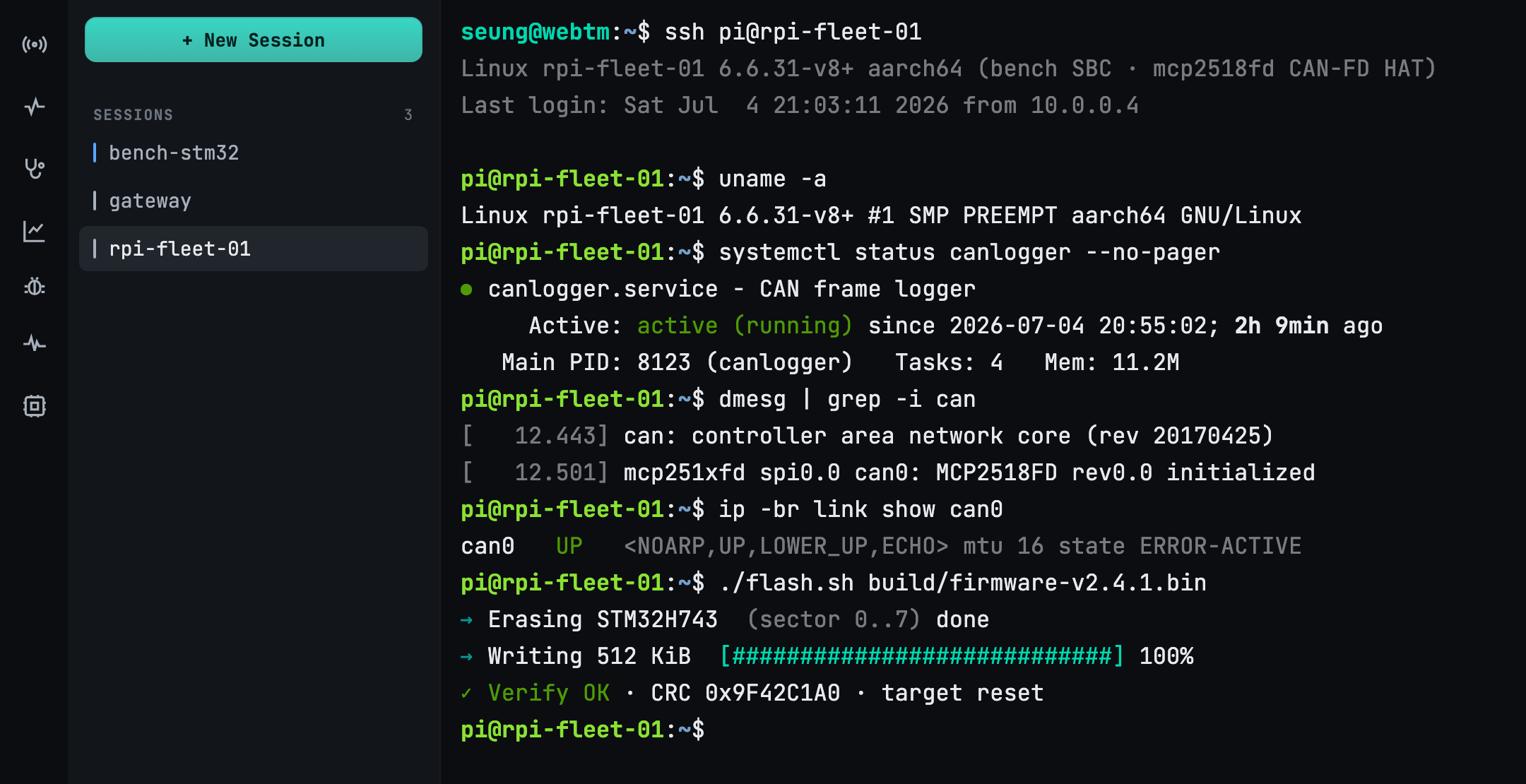
Full xterm.js emulation over WebSocket. tmux keeps every session alive across disconnects — close the tab, come back, nothing lost.
Open /dev/ttyUSB*, ttyACM*, tty.* from the browser.
Hot-plug detection finds new adapters with no restart — even from an iPad.
CAN / CAN-FD monitor, UDS vehicle diagnostics over DoIP & ISO-TP, and XCP measurement with live DAQ — all on one unified transport.
Bring your own model (BYOK). Feed a serial log for root-cause, a code fix, a build and a
shareable report — or just ask in plain language: “send start to every
serial.” The agent lists the targets, proposes the action, and waits for your approval
before it runs.
Serial, CAN, automotive UDS, and XCP calibration — multiplexed over a single
/ws/x WebSocket. Pick a device with a URI; the panel renders the protocol.
Live frame stream with hex filter, pause, and a frame injector. Classic CAN and CAN-FD with BRS — extended IDs, RTR, the lot.
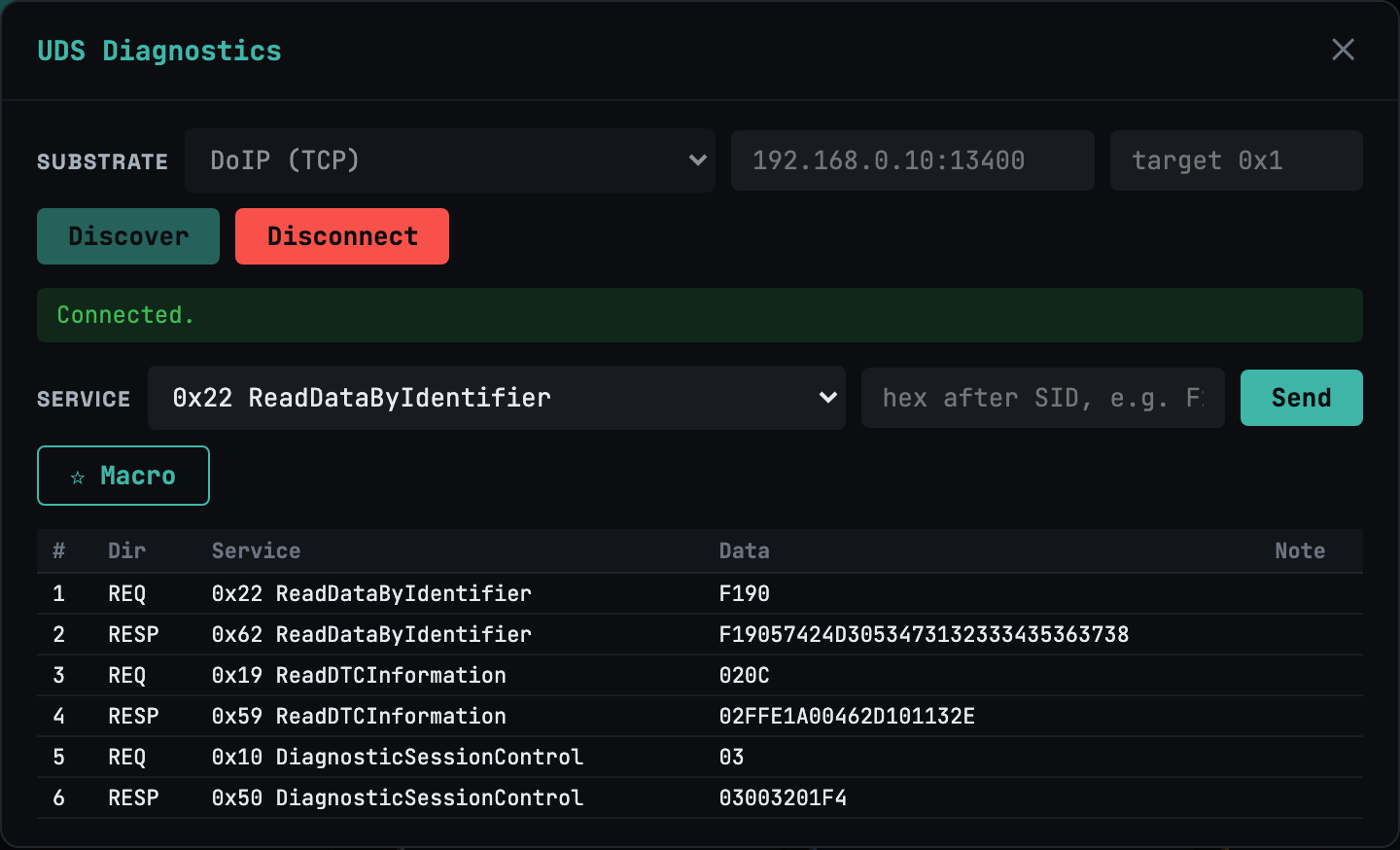
Service builder over DoIP/TCP and ISO-TP/CAN (CAN-FD too). Flow-control pacing, read-only gating, and DoIP UDP Discover for announced ECUs.
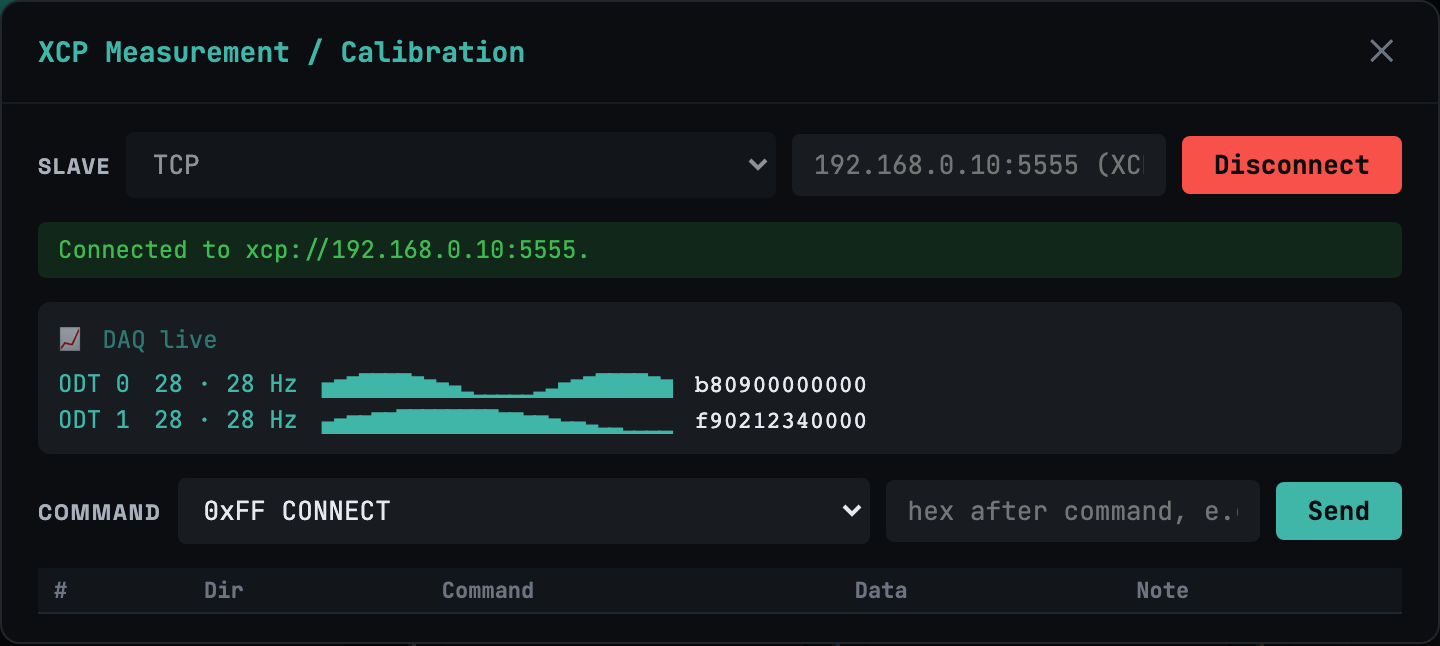
XCP on Ethernet (TCP/UDP) and CAN. Command builder plus a live DAQ view — periodic measurement streamed straight into the browser.
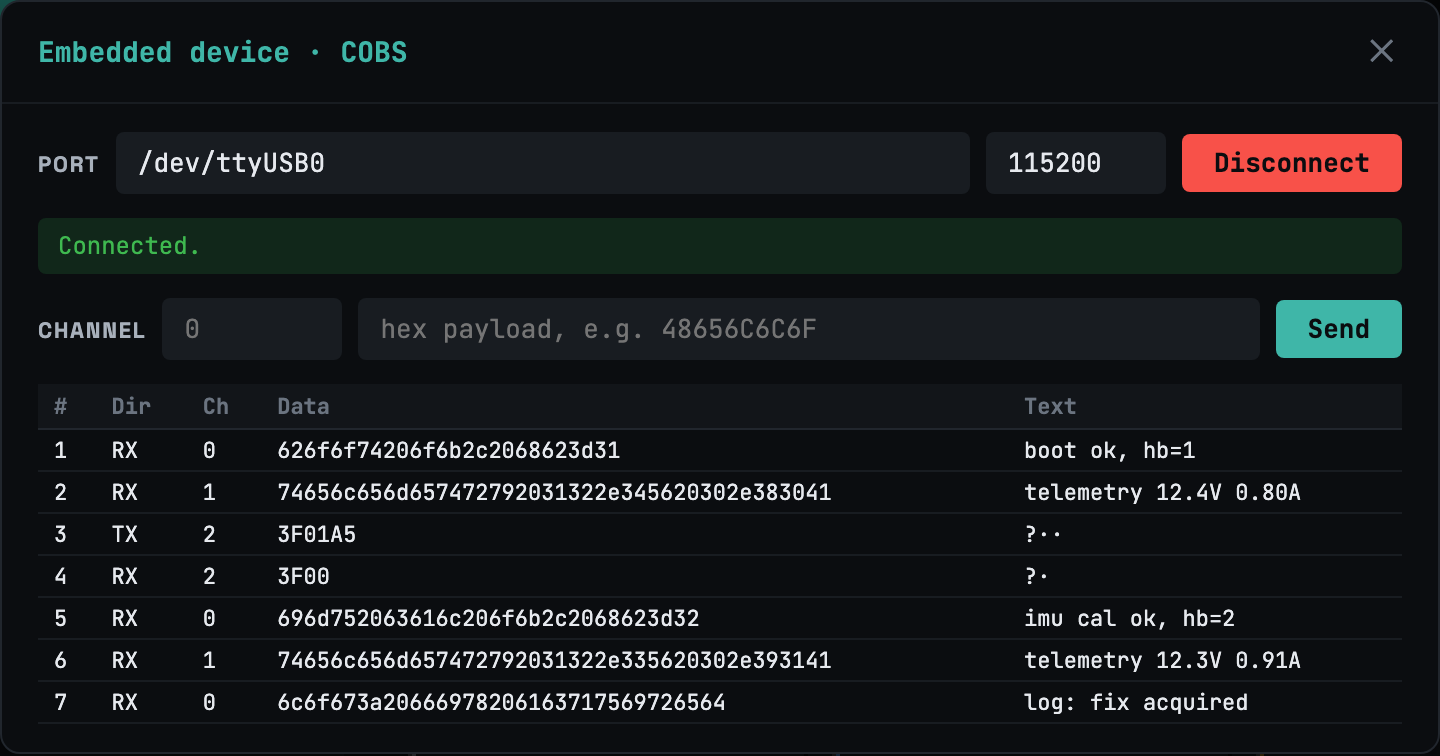
Open serial://…?framing=cobs for COBS+CRC channel-multiplexed links —
split one UART into clean logical channels in the 🧩 Embed panel.
Every device is just a URI on /ws/x.
# serial byte stream / COBS-framed
serial:///dev/ttyUSB0?baud=115200
serial:///dev/ttyUSB0?framing=cobs

# CAN / CAN-FD
can://can0?fd=1

# UDS over DoIP (TCP) / over ISO-TP (CAN-FD)
uds://doip/192.168.0.10:13400
uds://can0/0x7E0?rx=0x7E8&fd=1

# XCP on Ethernet / on CAN
xcp://eth/192.168.0.10:5555
xcp://can0/0x100?rx=0x101&fd=1

# remote device via agent (Ultra)
agent://rpi-001/serial/ttyUSB0?baud=115200
One web screen for the whole job — connect, persist, broadcast, debug.
A 256 KB ring buffer per session plus smart reconnect replays every byte you missed. Flaky Wi-Fi stops being a problem.
Send one command to many boards at once — parallel, sequential, or rolling — and watch each device's output side by side.
A virtual key bar (Esc, Tab, Ctrl, arrows) and a ⌘K command palette make a
real terminal usable on a phone or tablet.
An agent exposes a remote board's serial or CAN as agent:// — self-registers
with a join token, then debug hardware on the other side of the world.
Hand someone a read-only URL to your live session — no install, no account, no setup on their end.
One 10 MB static binary, CGO_ENABLED=0, web assets embedded. PWA install,
offline-capable, expose via Cloudflare Tunnel in one flag.
Bring your own model — Claude, OpenAI, or a local Ollama. The whole loop happens in the tab.
A HardFault or stack trace lands on the serial console.
The model reads the log and pins the root cause.
It proposes a patch; you approve; it builds.
A shareable web report captures what changed and why.
SSH clients stop at SSH. Serial tools stop at serial. CAN and diag suites are each their own app. webtm is the entire bench.
| Teleport tmate | minicom | SavvyCAN | CANape | webtm | |
|---|---|---|---|---|---|
| SSH terminal | ✓ | — | — | — | ✓ |
| Serial / UART | — | ✓ | — | — | ✓ |
| CAN / CAN-FD monitor | — | — | ✓ | ✓ | ✓ |
| UDS diagnostics (DoIP/ISO-TP) | — | — | — | ✓ | ✓ |
| XCP measurement / DAQ | — | — | — | ✓ | ✓ |
| 1:N broadcast · AI agent | — | — | — | — | ✓ |
| In a browser · runs on iPad | — | — | — | — | ✓ |
| Self-hosted, one binary | — | ✓ | ✓ | — | ✓ |
Each rival is a single point on the bench. webtm is the only one that does all of it — from a browser, self-hosted.
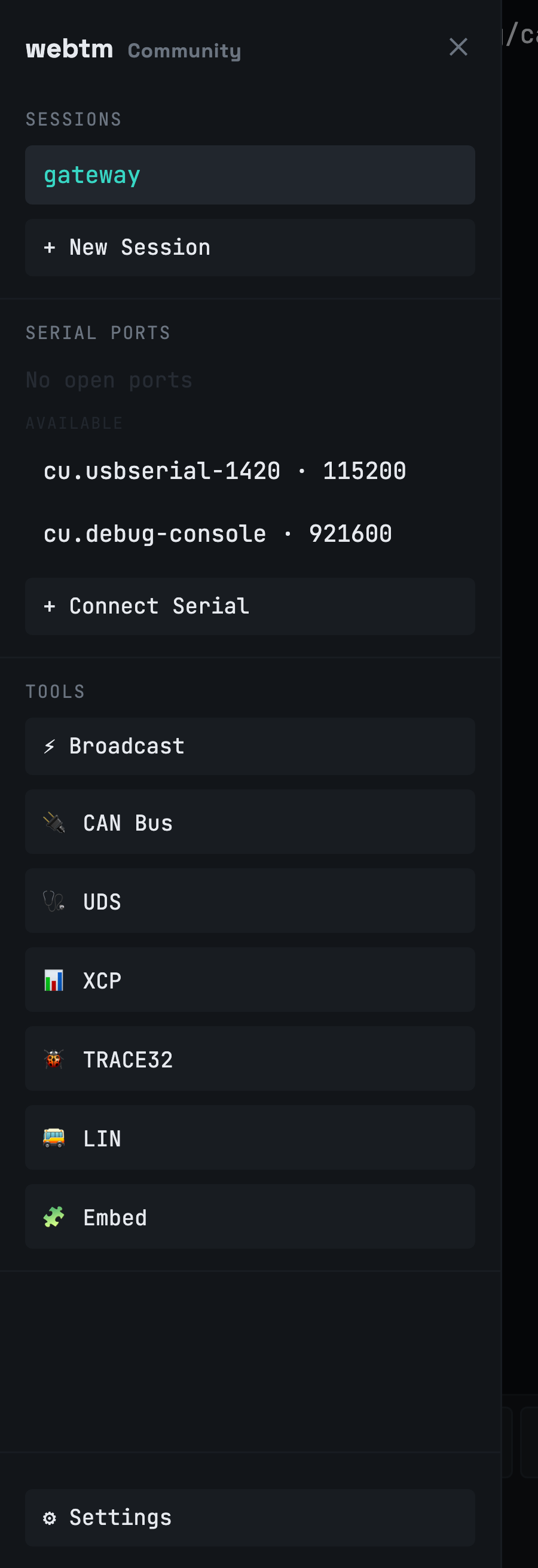
webtm installs as a PWA and goes full-screen on touch. A virtual key bar puts Esc, Tab, Ctrl, and arrows under your thumb, and a swipe drawer holds your sessions, ports, and diagnostics. The thing nobody else lets you do: open a serial console on hardware from a tablet.
webtm is self-hosted. ttyd and the serial manager bind to 127.0.0.1 only — the
gateway is the single door, where auth, license, and session limits live. Raw automotive egress
(DoIP/XCP) is opt-in and off by default; tcp:// has an SSRF guard. Licenses validate
offline with Ed25519 signatures: no call-home on startup, ever.
Run it yourself — free for personal and non-commercial use. Upgrade only when you need teams, scale, or the hardware-fleet features.
Personal & non-commercial
For working developers
For embedded teams & fleets
| Community | Pro | Ultra | |
|---|---|---|---|
| SSH terminal sessions | 2 | Unlimited | Unlimited |
| Local serial / UART ports | 1 | Unlimited | Unlimited |
| CAN · UDS · XCP diagnostics | ✓ | ✓ | ✓ |
| tmux persistence · PWA · ⌘K | ✓ | ✓ | ✓ |
| Read-only session sharing | — | ✓ | ✓ |
| Multi-user accounts | — | ✓ | ✓ |
| Per-device access control | — | ✓ | ✓ |
| Remote serial / CAN (Agent) | — | — | ✓ |
| 1:N broadcast | — | — | ✓ |
| AI debugging (BYOK) | — | — | ✓ |
| Conditional access policy | — | — | ✓ |
| Audit logs | — | — | ✓ |
Billed via Paddle · licenses are Ed25519-signed and validate offline. Already subscribed? Manage or cancel your subscription.
✅ Payment received — your license key is on its way to your inbox. Install webtm below, then paste the key in Settings → Billing.
The short version of what webtm is, how it differs, and what it costs.
webtm is a self-hosted web terminal that runs as a single 10 MB static binary.
In one browser tab it provides SSH and serial/UART consoles, CAN / CAN-FD monitoring,
UDS (ISO 14229) and XCP vehicle diagnostics, and AI-assisted debugging. Every device is
addressed as a URI multiplexed over a single /ws/x WebSocket.
Most web terminals stop at SSH, and serial, CAN, and diagnostic suites are each a separate app. webtm is the only one that combines SSH, serial/UART, CAN / CAN-FD, UDS diagnostics, XCP measurement, 1:N broadcast, and an AI agent — from a browser, self-hosted on one binary, and usable on an iPad.
Community is free for personal and non-commercial use (2 SSH sessions, 1 serial port, full CAN/UDS/XCP diagnostics). Pro is $9/month for unlimited sessions, session sharing, multi-user accounts, and per-device access control. Ultra is $39/month, adding remote serial/CAN agents, 1:N broadcast, AI debugging (bring your own key), conditional access, and audit logs. Billing is via Paddle and licenses validate offline.
webtm is self-hosted, so your data stays on your machine. ttyd and the serial manager bind
to 127.0.0.1 only; the gateway is the single door where auth (bcrypt/JWT),
license, and session limits live. Raw automotive egress (DoIP/XCP) is opt-in and off by
default, tcp:// has an SSRF guard, and licenses validate offline with Ed25519
signatures — there is no call-home on startup.
Yes. You install webtm on a Mac, Linux box, or Raspberry Pi, then open it in Safari and add it to the Home Screen as a PWA. It goes full-screen on touch with a virtual key bar (Esc, Tab, Ctrl, arrows), a swipe session drawer, and a ⌘K command palette — letting you open a serial console on real hardware from a tablet.
AI debugging is bring-your-own-key (BYOK): you can use Claude, OpenAI, or a local Ollama model. The agent reads a serial log to find the root cause, proposes a fix, builds it, and generates a shareable report — waiting for your approval before it runs any action. It is available on the Ultra plan.
curl -fsSL https://webtm.dev/install.sh | sh
One static binary lands in your PATH. No runtime, no dependencies.
webtm up
Starts on localhost:4100. Add --auth or --tunnel when
you're ready to expose it.
open http://localhost:4100
Terminal, serial, CAN, UDS, XCP, and the AI panel — in the browser, on any device.